
Deskferry official
LAN clipboard: get the two Macs reaching each other first
Both Macs have internet. That tells you nothing about whether they can see each other.
A LAN clipboard only works when the two computers can actually see each other. Deskferry passes copies between Macs on a mutually reachable local network, so one can sit on Ethernet while the other is on Wi-Fi. What decides the outcome is the path your network permits between them — not which icon each Mac happens to show in the menu bar.
Set up a LAN clipboard on a network you control
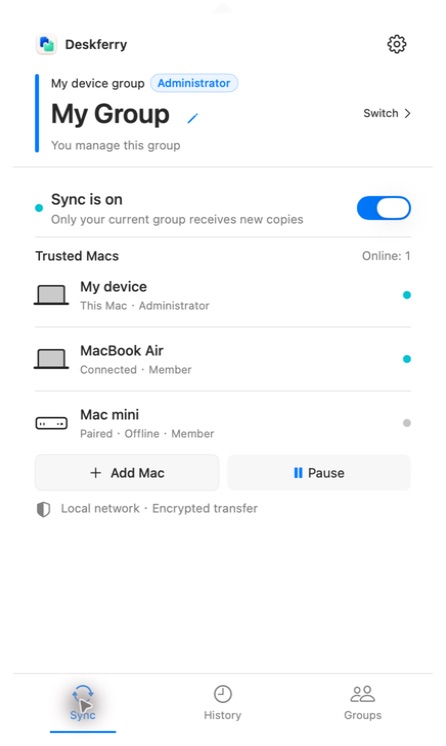
For a first setup, use a home or office LAN you can make decisions about. Install Deskferry and open it on both Macs, use Add Mac in the administrator's group to invite the second one, approve it as administrator, then select that same group at both ends.
Say yes when macOS asks for local network access. Without it the other Mac will not appear at all, and you will spend the next ten minutes debugging a permission dialog you dismissed. On a managed computer or a managed network, ask whoever runs it to check the policy — do not switch off security controls to force a pairing through.
No device listed? Test whether they can reach each other
Guest Wi-Fi, wireless client isolation and separated subnets can each let a Mac browse the web perfectly while blocking every packet to the machine sitting beside it. On your own network, put both Macs on the same non-guest network for a moment and compare. In an organisation, ask the network administrator which paths between clients are permitted.
"Both Macs are online" does not satisfy a LAN requirement. There is no internet relay here: Deskferry will not carry content between a Mac at home and a Mac at the office, so when the local path is missing there is no fallback to fall back on.
Run one controlled comparison. Put both Macs on the same permitted non-guest LAN, leave the app open on each, and watch whether the invited or paired device appears. Then copy a fresh sentence and check the paste. If that works where the original network did not, you now have something concrete to report to the network administrator. Leave the app's settings alone throughout, so that a network change and a pairing change do not get tangled together.
Paired but nothing arrives? Check the current group
A Mac can be a trusted member and still be offline, and the group you joined last week is not necessarily the group selected right now. Both Macs have to be in the same current group, and connected, before a new copy is carried. To bring in a Mac that was never paired, choose Add Mac in the administrator's group, then on the other Mac choose Join a Group, select the nearby invitation, enter the six-digit code, and wait for the administrator to approve it. The first-time setup steps cover creating a group, and what happens when a code expires.
- Select the shared group on both Macs and resume sync at each end.
- Copy a fresh, ordinary sentence on the Mac you are sending from.
- Paste into a text app on the other Mac, and confirm it is that new sentence rather than an earlier one.
Text arrives, files do not
Good news, in a way: once plain text crosses reliably the connection is off the suspect list, and you can narrow the search to the content itself. The file switches at both ends, the types the administrator allows, the expanded size of what you selected, whether the source files are readable. Check that the destination folder is writable and has room. One small PDF that is fully downloaded is far easier to diagnose than a mixed selection of large assets.
See copying files between Macs for the Finder actions, the size settings, and the final check of opening the received file.
Ask for help in a way that can be acted on
Tell support the macOS version on each Mac, whether they are on Wi-Fi or Ethernet, whether the other Mac is visible at all, whether plain text arrives, and the exact wording of any message you see. Leave out pairing codes, passwords and the clipboard content itself. None of that is needed to describe the step that failed, and you should not be sending it to anyone.
FAQ
Questions, answered
Does the same Wi-Fi name guarantee the Macs can reach each other?
No, and this trips up more people than anything else on this page. Guest isolation, VLANs and network policy can keep clients apart even when the network name is identical. Internet access at both ends proves nothing about the path between the two Macs.
Can one Mac use Wi-Fi while the other uses Ethernet?
Yes, as long as the network lets those two computers reach each other. The requirement is about the path, not about matching connection types.
The invitation code expired. Do I have to create a new group?
No. Generate a fresh six-digit code with Add Mac and run Join a Group again on the other Mac. A code lives for 120 seconds and allows three authentication attempts before you start over. Pairing steps.
Can Deskferry link my home and office Macs over the internet?
There is no internet relay. Use it where the Macs share a local network on which they can reach each other, and do not treat being online at both ends as enough.
Guides
Your next useful read
Mac clipboard sync for the two Macs you switch between
The address is on the laptop. The field waiting for it is open on the desktop. That gap is the whole problem.
Read the guideCopy between MacsCopy and paste between Macs, one working handoff at a time
Five conditions have to line up before this works at all. Most people have four of them right.
Read the guideTransfer filesTransfer files between Macs without leaving Finder
Copy at the source. Paste at the destination. Open the file and get back to work.
Read the guideDeskferry
Keep the next step simple.
Continue on another Mac, hand off a file, or find an earlier copy.
macOS 14+ · One Mac for history · Reachable LAN for sync
